










or
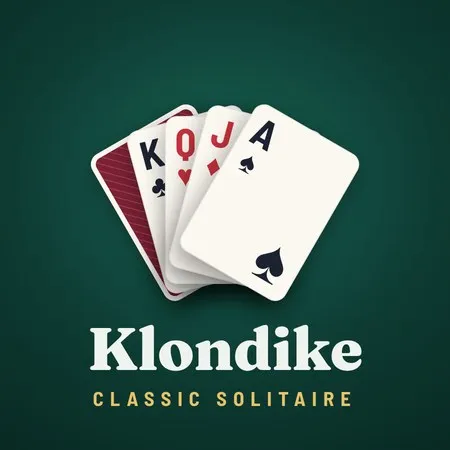
Solitaire: Klondike Classic
Sponsored links
More Popular Games
More Online Games
Solitaire: Klondike Classic — Game Overview
There’s something deeply satisfying about a clean game of Klondike, and Solitaire: Klondike Classic understands that old-school appeal without trying to reinvent the wheel. If you’ve spent years playing card games on desktop, mobile, or those quiet browser tabs you open between tasks, this one slots neatly into that familiar space. It is the kind of game you can open for a quick round and end up staying with far longer than planned, which is exactly what a good solitaire release should do.
As an experienced gamer, I tend to judge these classics on three front lines: how fast I can start a round, how readable the interface feels, and whether the game respects the rhythm of traditional Klondike. On those points, Solitaire: Klondike Classic does a solid job. It keeps the rules recognizable, the pacing smooth, and the presentation low-friction. That may sound simple, but simplicity is the entire point here. This is not a flashy puzzle with gimmicks piled on top; it is a streamlined card game built for repetition, focus, and those small wins that make one more deal feel worth it.
First impressions: familiar, fast, and easy to play
The best thing about Solitaire: Klondike Classic is that it wastes little time. You can download or launch into a session quickly, and the game immediately communicates its intent: deal the cards, make your moves, and settle into the classic loop. For players who want something free and accessible, that matters. There’s no need to learn a new system or memorize gimmicky mechanics. If you already know Klondike, you are in business. If you are new, the onboarding is gentle enough that the basics click quickly.
The visual style leans into clarity rather than flair. Cards are easy to read, the table layout feels spacious, and the contrast is generally kind to the eyes during longer sessions. That’s important because solitaire lives or dies by readability. A messy interface can turn a relaxing card game into a chore. Here, the game keeps everything within reach, and that restraint makes it better for both short breaks and extended play.
Core gameplay: classic Klondike done with discipline
At its heart, this is standard Klondike solitaire, and that is a compliment. You build descending sequences in alternating colors, move aces to the foundation, and work through the draw pile with patience and planning. The game does not try to overcomplicate the formula, which means success and failure feel tied to your choices rather than to some random twist layered on top.
The pacing is where the game shines. Every move carries that familiar little hook, especially when a hidden card flips over and opens the board. That one reveal can change the whole shape of the round. You start to think several steps ahead, gauging whether to shift a king, preserve a column, or hold back a move in hopes of something better. That mental rhythm is what keeps Klondike evergreen, and Solitaire: Klondike Classic handles it cleanly.
There is also a reliable sense of momentum. Even when a round feels locked up, the game invites you to rework the board and spot patterns you missed before. That’s one reason people keep coming back to solitaire: it’s part logic, part patience, part gut instinct. This release preserves that balance nicely.
Controls, Flow, and the small details that matter
Good solitaire games are judged in the margins. How responsive is the drag? Does auto-move help or get in the way? Can you tap or click without fighting the interface? Solitaire: Klondike Classic performs well in these everyday tests. Moves feel responsive, card placement is generally clean, and the flow stays unobtrusive. For a game built around repetition, that unobtrusive feel is exactly right.
One thing I appreciate is how the game avoids padding out the experience with unnecessary extras. There’s no elaborate story, no awkward detours, and no pressure to master layers of menus before you can start another round. In a market full of overbuilt casual titles, that restraint stands out. It feels designed by people who understand that solitaire is about the cards first and everything else second.
That said, if you are someone who wants a more elaborate meta-layer, this may feel intentionally barebones. There are no dramatic systems to grind through and no major strategic upheavals waiting to surprise you. But that is not a flaw in a game like this. It is a design choice, and with this genre, less often really is more.
Where it fits among modern card games
Solitaire: Klondike Classic does not attempt to compete with sprawling digital card platforms or competitive decks. Its place is more modest and, frankly, more useful. It is the game you reach for when you want a dependable single-player card experience that is easy to install, quick to understand, and friendly to repeat sessions.
That makes it ideal for players across many platforms, especially if you are hopping between devices or looking for a no-drama way to play on a lunch break. It suits fans of traditional card games, older players who want the familiar cadence of desktop solitaire, and newer players who are simply looking for a calm, free option that delivers exactly what it promises.
In that sense, it also earns points for being easy to recommend without caveats. There’s no complicated onboarding and no need for cheats or mods to enjoy it. The whole experience is built around the elegance of the base game, which is probably why it works so well.
Difficulty, replay value, and the long tail
Klondike has always thrived on replay value, and this version understands that the real hook is not novelty but consistency. Every round invites a new arrangement of the deck, and every deal asks you to make the same familiar decisions with slightly different consequences. That gives the game a nice long tail, especially for players who enjoy chasing cleaner runs, faster clears, or just the satisfaction of making the board open up the right way.
The difficulty is also well pitched. A good solitaire game does not handshake you all the way through, but it should never feel punishing for the sake of it. Solitaire: Klondike Classic keeps that balance. Some rounds will collapse because that’s just how Klondike works, while others will reward patience and smart sequencing. The result is a steady loop that remains engaging without becoming exhausting.
If you are the sort of player who likes to measure progress in small improvements rather than big unlocks, there is real value here. Better card management, faster recognition of move order, and sharper use of empty columns all help you feel your own skill improving. That subtle learning curve is what makes solitaire endure.
Final verdict
Solitaire: Klondike Classic is exactly what the title suggests: a clean, no-nonsense take on a timeless card game. It does not pursue spectacle, and it does not need to. The game succeeds by being easy to access, pleasant to look at, and faithful to the core Klondike formula. If you want a free card game you can download, install, and start playing without friction, this fits the bill.
For players who appreciate classic design and value smooth, uncomplicated sessions, it makes a strong case for itself. It is not trying to be the deepest solitaire app on the market, but it is probably trying to be one of the most dependable. In that role, it performs well. If your taste runs toward timeless mechanics, practical presentation, and a game that respects your time, Solitaire: Klondike Classic is worth keeping around.
How to download Solitaire: Klondike Classic
Availability & Launch: Solitaire: Klondike Classic is typically available as a free download through official app stores or browser-based versions, depending on region and release channel. Launch is usually immediate, with no heavy setup needed.
Platforms: The game is commonly found on Windows PC, Mac, Android, and sometimes through web browsers. If a version is not natively supported on your device, you may need a browser build or an emulator/cloud setup to play it. Check the store listing for the exact platforms before you install.
Install: On mobile, open the app store, search for the game, and tap install. On PC or Mac, download the installer or launch the browser version, then follow the on-screen prompts. After that, open the game and start a round.
System Requirements: For PC and Mac, low-end hardware is usually enough; a basic dual-core processor, 2 GB RAM, and standard graphics support are often sufficient. On Android, a recent OS version and modest free storage should be enough for smooth play.
Cheats / Mods: Cheats and mods are generally not part of the standard experience, and unofficial versions are not recommended. The game is designed to be played fairly, without extra tweaks.
Unblocked Access: If there is a browser version, it may be playable in some restricted environments like school or work, depending on local network settings and site filters. Availability of an unblocked version varies, so access is not guaranteed everywhere.